Key Icon on Android Screen: What the Symbol Means and How to Remove It
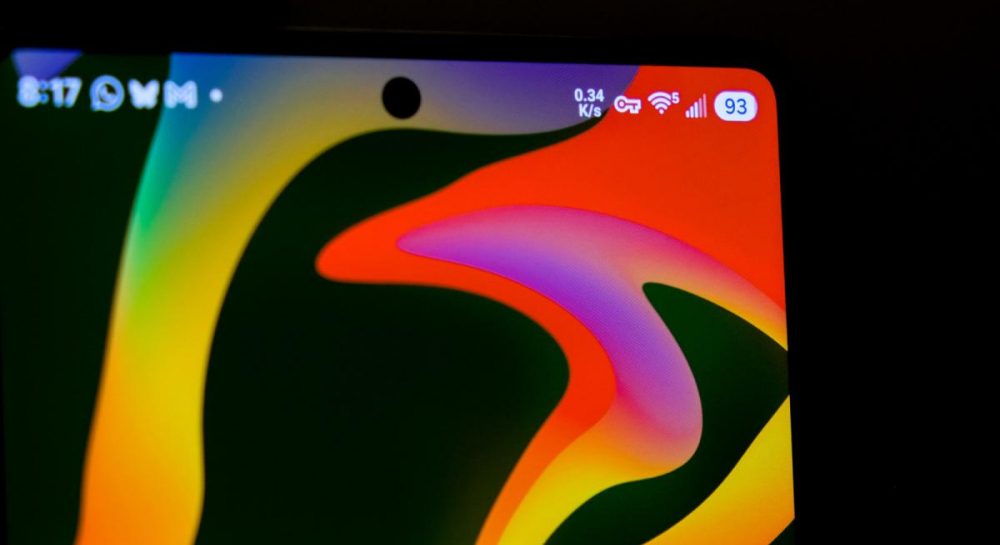
The appearance of a key icon in the Android status bar confirms an active VPN connection and encrypted internet data. Experts clarify the purpose of this indicator and how to manage it.
 💡Tech
Photo: UNIAN
Key points
- The key icon indicates an active VPN connection encrypting data on Android.
- Most Android phones restrict hiding the icon for safety reasons.
- Samsung Galaxy users can customize status icons via the Good Lock app.
Android smartphone users frequently notice a small key icon in the top notification bar. According to experts cited by Engadget, this system indicator does not signal a device malfunction or a security breach. On the contrary, the symbol confirms that an active VPN service is currently encrypting all incoming and outgoing internet traffic.
The key icon appears exclusively when data encryption is active. While it remains visible, the user's actual IP address is hidden, providing privacy when connecting to public Wi-Fi networks. If the symbol disappears, it indicates that the VPN connection has dropped and traffic is no longer encrypted.
Managing and Hiding the Status Indicator
On most Android devices, developers purposefully prevent users from hiding the key icon while the VPN remains active. This design choice ensures that users are always aware of their encryption status in the background. The only official exception applies to Samsung Galaxy devices, where users can download the Good Lock app from the Galaxy Store and disable the VPN icon via the QuickStar module.
For other smartphones, the simplest way to clear the icon is to turn off the VPN connection altogether. However, cybersecurity experts emphasize that using a VPN does not guarantee total digital anonymity.
Limits of VPN Technology
While a VPN hides user activity from internet service providers and local network operators, it cannot prevent tracking through logged-in accounts (such as Google or social platforms), cookies, or device fingerprinting.
- The key icon signals active network encryption on Android devices.
- Samsung Galaxy users can hide the indicator using the QuickStar tool.
- Certain websites may trigger CAPTCHAs when accessing them via VPN servers.
Additionally, some online platforms flag VPN traffic as suspicious, which may lead to frequent CAPTCHA prompts or temporary access restrictions until encryption is disabled.
Source UNIAN — unian.ua/techno/gadgets/znachok-klyucha-u-paneli-na-android-za-shch… ↗
Read next
 🛡️Security
US General evaluates risks of Russian attacks on NATO countries mirroring Ukraine scenario
Former US Army Europe commander Ben Hodges has warned about the vulnerability of NATO's air defense against mass Russian missile strikes.
 🛡️Security
Winter in Ukraine: Carpathians hit by snowstorms, forecasters warn of icy conditions
The high-altitude Carpathian mountains have been blanketed by heavy snowfall, with rescuers strongly advising against hiking due to hazardous weather.
 🎭Culture & Sport
Fashion Trends 2027: Stylist Olena Shevchenko Reveals Key Colors of the Season
Fashion expert Olena Shevchenko has released a forecast of the color palette that will dominate wardrobes in 2027.
 ⚽Sport
Alcaraz's Dominance and Leadership Crisis: ATP Finals Recap
Carlos Alcaraz confirmed his status as a top leader in men's tennis by winning the ATP Finals undefeated, despite battling a hip injury.
 🛡️Security
DTEK sets weekly record for power restoration
Over the past week, DTEK specialists restored power to more than 3.5 million Ukrainian households affected by shelling.
 🇺🇦Ukraine
Prospects for Direct Talks Between Zelensky and Putin: Parliamentary Assessment
Ukrainian officials are evaluating the feasibility of direct negotiations between the two presidents amidst a stalemate in the peace process.